What gets in the way for a restaurant
Happy guests… who never leave a review
Service went well, the guest thanks you on the way out, and still never thinks of Google. Disappointed guests are the ones who write without being asked: without a nudge, your rating does not reflect your dining room.
Floor staff already stretched
During the rush nobody has time to explain how to find your Google listing. You need something on the table that does the job by itself.
Competition happens on Google Maps
A tourist or a local compares three restaurants on Maps before choosing. Rating, number of reviews and how recent they are all weigh in.
Prizes must not cost a meal
Giving every guest a dish is not sustainable. You need prizes that please, cost little and bring people back to the table.
How it works with Voxtya
- A QR code on every table. The table tent or A6 format from the print pack, next to the salt and pepper or slipped into the bill folder: “Your Google review, then try your luck”.
- The guest enters a first name and email. They then open your Google review page with one button. A few seconds later the wheel unlocks. Their rating is never asked and nothing reads their review.
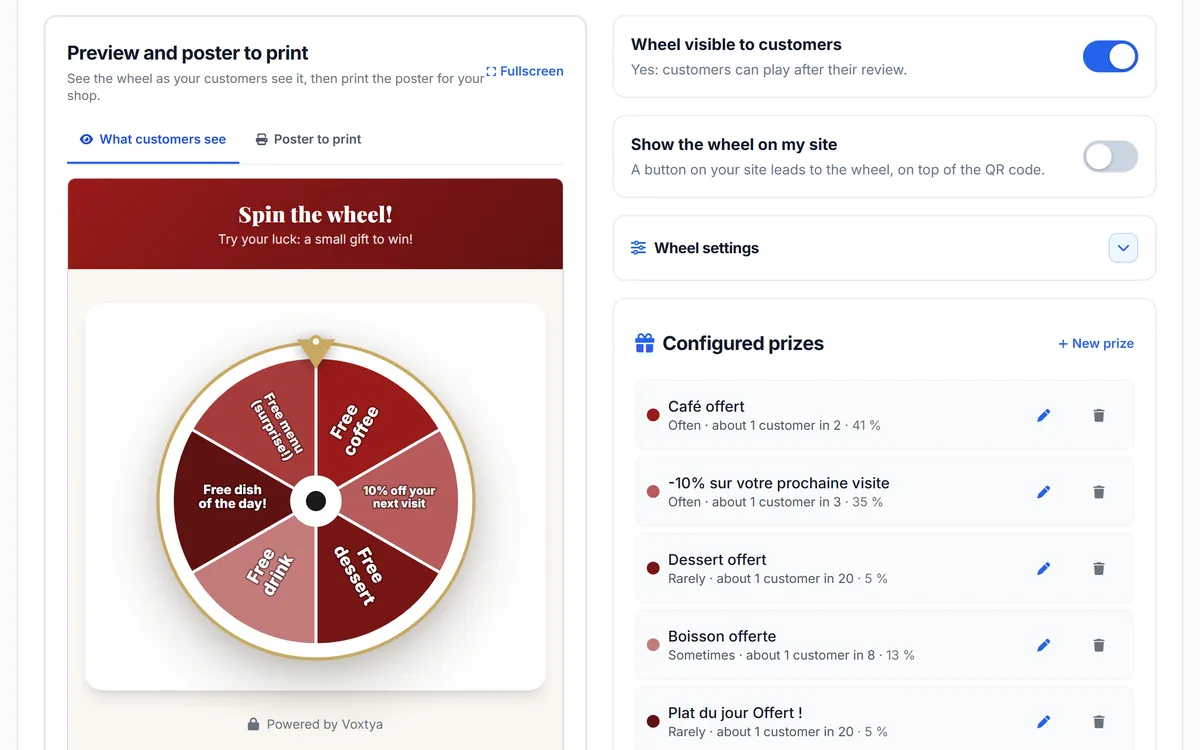
- You choose the prizes and their odds. For example a coffee, a dessert, a soft drink, 10% off the next bill, and a “Thanks, see you soon” segment. You set each segment’s probability.
- The prize is collected next visit. The code is shown on screen and emailed, valid 30 days by default (you can change it). The guest shows it to the server and you mark it as used in the winners list.
- You cap participations. An adjustable delay between two plays from the same email address stops a regular from playing at every lunch.
Try the example
Spin Le Bistrot du Marché’s wheel (demo)
Le Bistrot du Marché, a fictional restaurant in Lyon, has a demo wheel with 6 prizes and codes starting with LEBIS-. It is exactly what your guest sees after scanning the table QR code. In the demo nothing is saved and no email is sent.
In practice
| Prize (example) | Odds (example) | Cost to you | Effect |
|---|---|---|---|
| Free coffee | 30% | Very low | The guest comes back for lunch |
| Free dessert | 20% | Low | Introduces your dessert menu |
| Free soft drink | 15% | Low | A simple prize for all ages |
| 10% off the next bill | 10% | Variable | Brings a group back |
| “Thanks, see you soon” | 25% | None | Keeps the wheel profitable |
Odds given as an example: you set them yourself, segment by segment.
Prize ideas by type of restaurant
| Venue | Prizes that work well | Avoid |
|---|---|---|
| Brasserie, bistro | Coffee with mini desserts, dessert of the day, 10% off the next lunch | A free dish of the day: too expensive at scale |
| Pizzeria | Free tiramisu or drink, a free topping on the next pizza | A free pizza for every winner |
| Crêperie | A free sweet crêpe, a free apple juice | A full savoury galette for every winner |
| Fine dining | Petits fours, a free amuse-bouche, an invitation to a pairing evening | A big discount that cheapens your image |
| Fast food, takeaway | A free drink or dessert, €1 off the next meal deal | A dine-in prize if you have no seating |
Keep a “Thanks, see you soon” segment: not everyone wins, which keeps the wheel profitable. In France the Évin law restricts the promotion of alcoholic drinks, so prefer alcohol-free prizes (coffee, dessert, soft drink). To estimate how many reviews the wheel could bring you, use the reviews-per-month calculator.
Where and when to offer the wheel in a restaurant
- On the table, at coffee or bill time. That is when the guest is waiting with their phone in hand. One table tent per table is enough.
- In the bill folder. A small card with the QR code, slipped in with the receipt, is read at the right moment.
- At the counter and by the door, for guests who pay standing up or order takeaway.
- On takeaway bags: a sticker with the QR code, scanned at home.
- After an online booking: if you also use the Bookings service, a review request email goes out after the visit, with the link to your review page.
Do not offer the wheel at the start of the meal: the guest has nothing to tell yet. And do not offer it only to tables that look happy: the same QR code for everyone. The print pack includes 6 formats (A6, A5, square, table tent, DL, mini roll-up); for the QR code itself, see our Google review QR code page.
What to say on the floor
A poster does most of the work, but a word from the server makes it far more visible. A few simple lines you can reuse as they are:
- “If you have two minutes, a Google review really helps us. Afterwards you can try your luck on the wheel with the QR code.”
- “We read every review, good or less good. The QR code is on the table, there is a little game at the end.”
- When handing back the card: “The QR code on the table is for your Google review and the wheel: maybe a free coffee next time.”
Never say “5 stars”, “a good review” or “a positive review”. Talk about a review, whatever it says. More lines and moments in our guide to Google reviews for restaurants and in how to ask for a Google review.
A worked example for a restaurant
Take the same example as on our wheel of fortune for Google reviews page: a restaurant serving 1,500 guests a month, with the wheel poster on the tables. If 6% of guests play and go through your Google page, that is about 90 visits a month to your review page. If 30% of players win a prize, that is 27 gifts a month, mostly coffees and desserts.
These are assumptions to adapt: results depend on your footfall, where you place the QR code and what your team says. The wheel does not check that a review was posted, so the number of reviews received can be lower than the number of plays. Track both in your account: plays and winners in the wheel list, new reviews in the Reviews tab.
Wheel of fortune and Google’s rules: what you need to know
Google Maps’ policy on user-contributed content says merchants must not “offer incentives – such as payment, discounts, free goods and/or services - in exchange for posting any review”, nor “discourage or prohibit negative reviews, or selectively solicit positive reviews from customers”. Google can remove reviews it considers affected and, if abuse is repeated, restrict the listing.
In practice, for a wheel of fortune:
- The prize never depends on the rating or what the review says. Voxtya’s wheel never asks for the rating and does not read the review.
- Everyone gets the same access: the same QR code for every customer, without picking those who look happy.
- Nothing checks that a review was posted: the customer opens your Google page with one button, then the wheel unlocks a few seconds later.
- Your materials talk about a review, whatever it says, never “5 stars”, “a good review” or “a positive review”.
To be straight with you: a game offered right after an invitation to leave a review is a practice Google may look at closely. The more your wheel is presented as a small thank-you game open to everyone, the less ambiguity there is. The details, with ready-made lines for your posters: prize wheel and Google reviews: the rules to follow.
How much it costs
Review collection
€29/month
€23/month billed annually
Review collection + Replies
€49/month
€39/month billed annually
No commission, no commitment, 30-day free trial (card required, nothing is charged before the trial ends). All prices: Pricing page.
30 days free
Wheel of fortune · Restaurant
A QR code on the table, the Google review then the wheel: a coffee or dessert on the next visit.
Read and try next
- How to get more Google reviews for your restaurant
- How to get more Google reviews: the complete guide
- Customer retention for small local businesses: a practical guide
- Google review calculator
- Voxtya for a restaurant
- Booking software for a restaurant
- Google reviews for a restaurant
- Website for a restaurant