Google Business posts are one of the most underused tools for local businesses. A few minutes per post, published every week, keep your listing alive. Here is the playbook.
Updated
What you see in Voxtya
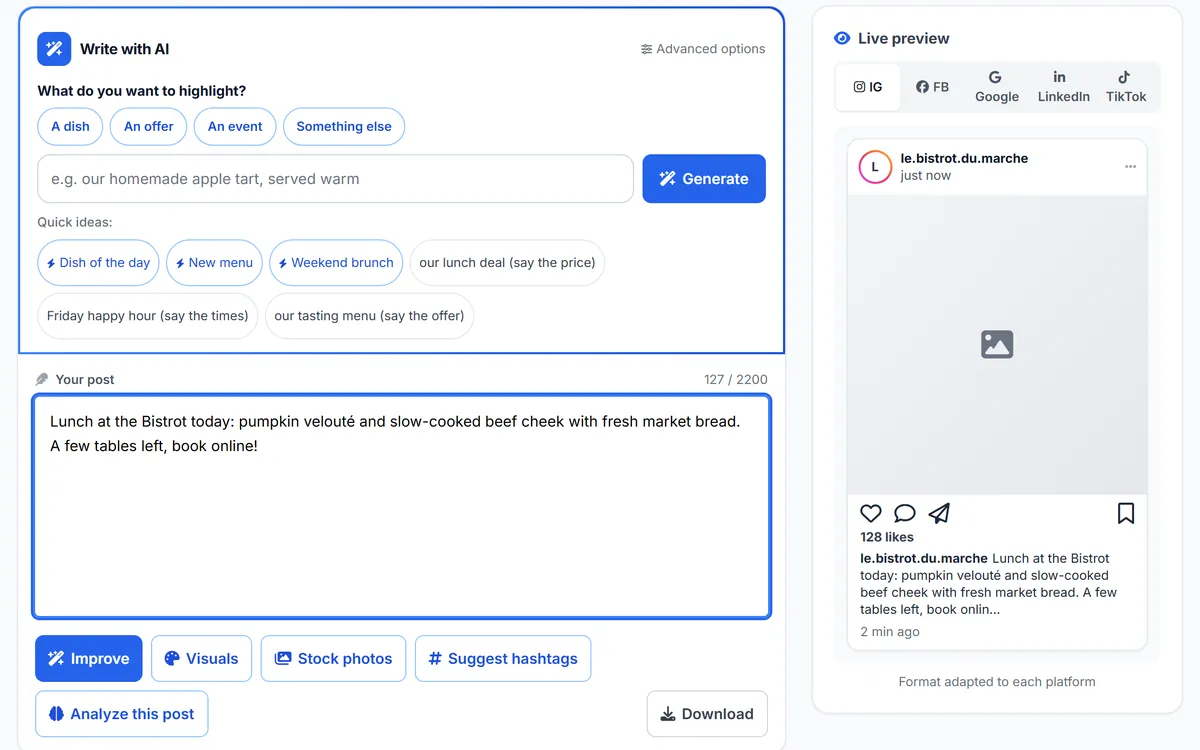
The post studio — example: demo business
Posts show up on your Google listing. They tell customers (and Google) that your business is open and active, and they put forward your offers, events and news.
Some posts are clicked and lead to a call, a visit to your website or a booking. Above all, regular posts make your listing look alive compared with a competitor who never posts.
Google Business posts are free and powerful, yet 90% of businesses do not use them, and fewer than 10% of local businesses post regularly. That is a big opportunity you are leaving to your competitors.
A post is a short publication (up to 1,500 characters) with an image, text and a call-to-action button. It appears directly on your Google listing when someone searches for your business or a similar one. Google favours active, regularly updated listings: posting tells the algorithm your business is alive. Several studies show that listings posting at least once a week see 15 to 25% more impressions in local results.
The text of your posts is also indexed by Google. It is a way to add relevant keywords to your listing without changing your description. For example, a florist posting about “Valentine’s Day rose bouquets in Brighton” adds themed, local content to the listing. Posts stay visible for 7 days (except events), so aim for at least one post a week. For the other ranking signals, see Google Maps ranking factors.
Time-limited promotion with a start/end date and CTA. Example: "20% off weekday lunches until March 31". Indexed on "lunch offer [city]" queries. Best for restaurants, salons, retail.
Upcoming event with date/time/location. Example: "Live jazz night Friday March 15, 8pm". Indexed on "live music [city]", "events [neighborhood]". Best for bars, restaurants, cultural venues.
Business news, new arrivals, seasonal specials, team updates. Example: "New spring menu launched with 6 local-sourced dishes". Indexed broadly on your category + updates.
Specific product/service with photo, price, description. Best for retail, service businesses. Example: "$85 chair massage — 30 minutes, includes hot stones".
Voxtya's AI Studio suggests post ideas adapted to your trade and writes them for you; you review them and publish with a copy-paste.
“Discover our new summer dress collection! Book your fitting online now and get 10% off your first order.” It has a clear call to action, relevant keywords (summer dresses, online fitting) and an attractive photo of the collection.
Plan your posts around the year’s key dates with our small business marketing calendar, and avoid the Google Business Profile mistakes that undo the effort. More formats: 5 Google post formats that help your ranking.
Voxtya, the French all-in-one platform for local businesses, helps you run your Google Business posts efficiently: you prepare and plan posts in a few clicks, then publish them with a copy-paste, and follow your visibility over time. Voxtya also handles your Google reviews, commission-free bookings and social media, in one tool.
| Feature | Voxtya | Horus | Wix + Zenchef |
|---|---|---|---|
| Google Business posts | Yes | No | No |
| Google reviews management | Yes | Yes | No |
| Commission-free bookings | Yes | No | Yes, but with Zenchef only |
| Price | €29/month per service (Suite of 6 services: €119/month) | €69.90/month | €150/month (Wix + Zenchef combined) |
A made-up scenario. A bistro publishes one Google Business post a week (dish of the day, event, opening hours for bank holidays) and replies to every review. These are two of the signals Google looks at for an active listing; the effect on visibility builds over several months and varies from one business to another.
See the Social media service (AI Studio) and the Visibility & insights service to follow your competitors every month. Compared: Voxtya vs Malou and Voxtya vs Horus. Related reading: how to increase your Google rankings, optimising a restaurant’s Google profile, Instagram post ideas for restaurants and our local SEO checklist.
30-day money-back guarantee. Post ideas written for you, planned in a calendar.

