Practical guide

AI auto-reply for Google reviews: software that automates your replies, and how to choose

Spending hours each week writing Google review replies? An AI generator can draft them in seconds — in your voice, without a template feel. Here's how it works and how to pick one. For the done-for-you service: reply to Google reviews automatically with Voxtya.

Updated

What you see in Voxtya
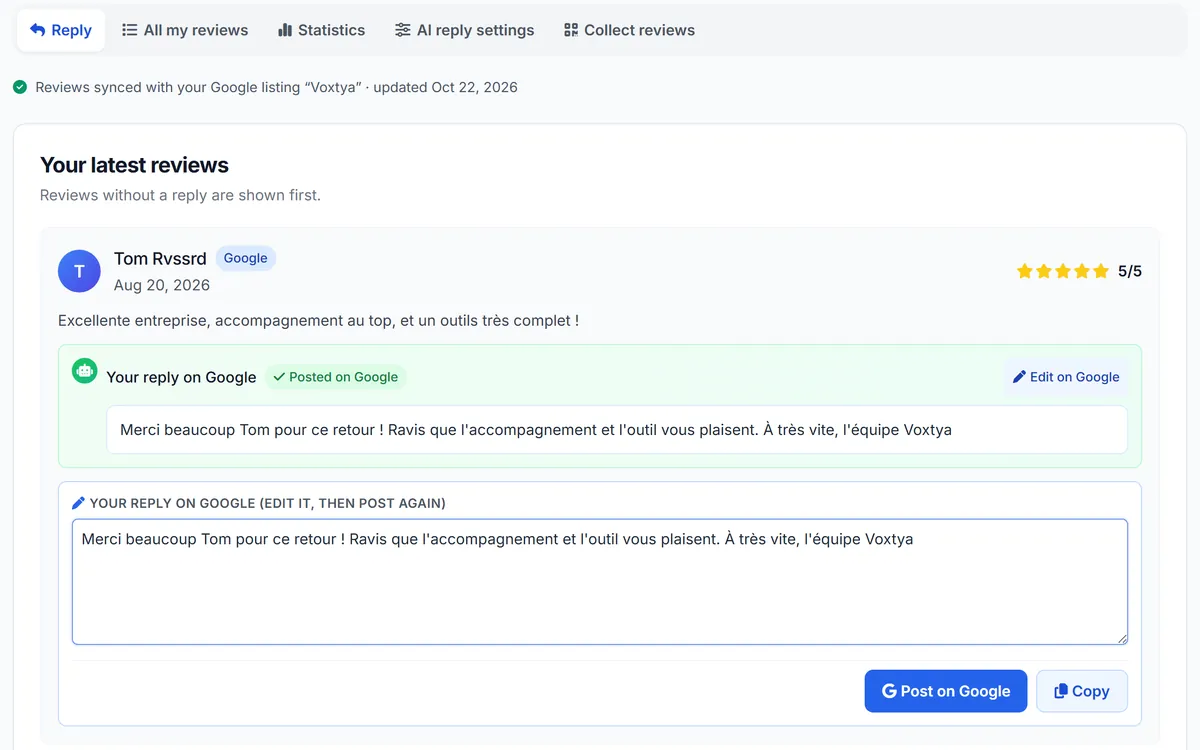
Voxtya “Reply to reviews” screen with the Google profile linked: a customer review, the reply “Posted on Google” and the “Post on Google” button to edit it

A review and its AI-drafted reply — example: demo business

  • Your latest Google reviews, unanswered ones first
  • A different reply for every review, drafted by AI in your tone, and editable
  • Posted on Google in one click, or automatically if you choose
Get started

Why manual review replies don't scale

A business getting a few dozen Google reviews a month can spend hours every week writing replies. For several locations, it quickly becomes a part-time job.

The result: many reviews never get a reply, and the ones that do often get the same copy-paste line ("Thank you for your review!"). Customers notice.

An AI generator solves three things:

  • Speed: a draft in seconds instead of several minutes.
  • Consistency: your tone stays the same, whoever approves the replies.
  • Coverage: every review gets a reply ready to publish.

AI review reply tools compared (2026)

Updated November 3, 2026. Competitor prices come from our side-by-side comparisons (dates on each page); check the vendor’s site before you sign. Criteria: Published price or quote only · Target size (1 shop or 50+ locations) · Services in one place: Google listing, reviews, website, bookings · Guarantee and lock-in · Self-serve set-up, no agency.

SoftwareEntry priceBest for
VoxtyaReview replies €29/month, €49 with Review collectionIndependent businesses that want a reply to every review, published on Google
NovaReplyFrom $29/monthBusinesses with website and digital presence already in place
ReviewflowzFrom $49/monthAgencies managing multi-client review monitoring
BirdeyeCustom quote (typically $250‑$1,000+/mo)50+ location chains in the US
Podium$289/mo starter (Podium Starter)US local services (dentists, auto, contractors)
GatherUp$75/mo starter → $300+ proPure review collection + NPS focus

The Review replies service in detail

How Voxtya's generator produces on-brand replies

Generic prompts end up sounding like a robot. Voxtya relies on three things:

  1. Your tone — you choose once: professional, warm or friendly, short or normal-length replies, your signature, your business type. Every reply follows it.
  2. The review itself — the AI reads the full review and rating and picks up specifics ("glad you enjoyed the beef bourguignon").
  3. Care on sensitive topics — for medical practices, for example, the AI never confirms that someone is a patient nor mentions a treatment.

In manual mode, you read every reply before publishing it.

Free tools vs Voxtya

ToolPricePersonalizationPublishing
Free ChatGPT copy-pasteFreeManual per reviewCopy-paste
Voxtya Review replies service€29/moYour tone, set oncePublished on Google: automatic or in one click
NiceJob$75/moYesManual
Podium AI$200+/moYesDepends on plan

With Voxtya, once your Google profile is linked (1 minute), you pick a mode: automatic (the reply is published on Google with nothing to do) or manual (you read it, then click "Publish on Google").

What a good AI reply looks like: 3 examples

5★ review (“Lovely brunch, the pancakes were amazing!”): “Thank you so much, Emma! We’re delighted the pancakes won you over: they’re our chef’s pride. See you soon for another brunch. — Tom, Café Lumière”

3★ review (“Good food but we waited 40 minutes”): “Thank you for your honest feedback, James. We’re glad you enjoyed the food, and sorry about the wait: Saturday lunch was busier than planned and we’re adjusting our staffing. We hope to welcome you back for a quicker visit. — Tom”

1★ review (“Rude staff, never again”): “We’re sorry to read this. That is not how we want anyone to be welcomed. Could you write to us at the address on our website so we can understand what happened? — Tom, manager”

Each draft picks up the details of the review and keeps your signature. Try it on one of your own reviews with our free AI review reply generator, then let the Review replies service prepare a reply for every new review. Method and templates: how to reply to Google reviews, positive review reply examples, 1-star reply templates and AI review replies done right.

Get started in three steps

  1. Set your tone once: professional, warm or friendly, short or normal-length replies, your signature and your type of business.
  2. Open a review: the AI drafts a reply that picks up what the customer mentioned (a dish, a member of staff, a wait).
  3. Read, adjust, publish: edit the draft if you want, then publish it on Google in one click. In manual mode, nothing goes out without you.

Want to test it before signing up? The free AI review reply generator works without an account, and our review reply templates give ready-made examples by situation.

Trades with special rules

Some businesses must be careful about what a reply says. A medical practice must never confirm that someone is a patient or mention their care: see our page on Google reviews software for medical clinics. A hotel or a restaurant can be warmer and more detailed. You set the instructions once and every draft follows them.

To compare Voxtya with other review tools on price and features, read our Google reviews software comparison. The full service is described on Review replies.

Mistakes AI replies help you avoid

  • The same sentence for everyone: customers notice copy-pasted replies.
  • Replying weeks later: a draft ready as soon as the review arrives makes it easy to answer quickly.
  • Getting defensive: on negative reviews the draft stays calm, thanks the person and invites them to get in touch.
30-day money-back guarantee, no commitment

Start with AI review replies

30-day money-back guarantee. Setup in a few minutes.

Also see: All plans · All features

Frequently asked questions

Which tool can automatically reply to Google reviews with AI?
To reply automatically to Google reviews with AI, Voxtya drafts each reply in your business’s tone and publishes it on your connected Google listing, automatically or after one click: Review replies service at €29 a month, €49 a month with Review collection, no lock-in.
Can I really tell the difference between AI and human replies?
With generic prompts, yes — templates feel robotic. With your tone set once and the review's details picked up, replies sound natural, and you can always edit them before publishing.
How many reviews can I reply to per month?
As many as you receive: Voxtya doesn't charge per reply.
Does Voxtya auto-publish or do I approve each reply?
You choose. Automatic: the AI replies to every new review and publishes the reply on your Google profile. Manual: you read each reply and publish it in one click. Your Google profile just needs to be linked to Voxtya (1 minute).
What if the AI writes something inappropriate?
In manual mode, you read every reply before publishing it; in automatic mode, 1 and 2-star reviews wait for your review by default. If a reply is not right, edit it or generate a new one in a few seconds.
Does it work in English and French?
Yes. The AI replies in the language of the review, so a business welcoming both English and French-speaking customers gets a draft in the right language each time.
Is there a free version?
You can test our free generator on a single review. The Review replies service (€29/month, 30-day money-back guarantee) prepares a reply for every new review on your Google listing.
What are AI review replies?
Replies to your Google reviews written by an AI from the review itself: the customer’s first name, the rating and what they wrote, in the tone you set once. You read and publish each one in one click, or let automatic mode post them (1 and 2-star reviews wait for you by default).
Can I give the AI my own instructions?
Yes. You can add instructions in plain words, for example “always sign with the first name of the manager” or “invite unhappy customers to call us”. Every draft follows them.
How much does the review replies service cost?
€29 a month (€23 a month billed annually), or €49 a month with review collection in the Reviews bundle. There is a 30-day money-back guarantee.

Go further